

-
Many screens
-
Shared data between components
- Logged-in users
- Permissions
-
API data
-
Forms and workflows
-
Real-time updates
-
Slow performance
-
Confusing code
- Difficult debugging
- Hard-to-maintain applications
Why State Management Still Matters in 2026
-
Real-time updates (notifications, chats, dashboards)
-
Large API responses
- User authentication and roles
- Multi-step forms
-
Offline support
-
Fast UI updates
-
Components re-rendering again and again
-
Data getting out of sync
- Bugs that are hard to track
- Slower feature development
-
Frustrated developers
-
Keep data predictable
-
Improve performance
- Make code easier to understand
- Scale your app safely
Redux in 2026
What Redux is Today
-
A single central store
-
Predictable data flow
- Clear separation of logic
- Strong debugging tools
Basic Redux Example (Redux Toolkit)
Store Setup
import { configureStore } from "@reduxjs/toolkit";
import userReducer from "./userSlice";

export const store = configureStore({
  reducer: {
    user: userReducer
  }
});
Slice Example
import { createSlice } from "@reduxjs/toolkit";

const userSlice = createSlice({
  name: "user",
  initialState: {
    isLoggedIn: false,
    profile: null
  },
  reducers: {
    login(state, action) {
      state.isLoggedIn = true;
      state.profile = action.payload;
    },
    logout(state) {
      state.isLoggedIn = false;
      state.profile = null;
    }
  }
});

export const { login, logout } = userSlice.actions;
export default userSlice.reducer;
Using Redux in a Component
import { useDispatch, useSelector } from "react-redux";
import { login } from "./userSlice";

function LoginButton() {
  const dispatch = useDispatch();
  const isLoggedIn = useSelector(state => state.user.isLoggedIn);

  return (
    <button
      onClick={() => dispatch(login({ name: "John" }))}
    >
      {isLoggedIn ? "Logged In" : "Login"}
    </button>
  );
}
Strengths of Redux
-
Single source of truth
-
Very strong DevTools
- Easy to debug complex flows
- Clear business logic separation
-
Great for large teams
-
Huge ecosystem
Limitations of Redux
-
More setup compared to Zustand
-
Can feel heavy for small apps
- Requires proper architecture discipline
Best Use Cases for Redux
-
Enterprise dashboards
-
Banking and fintech apps
- Healthcare platforms
- SaaS products
-
Apps with complex workflows
-
Large teams working together
Zustand in 2026
What Zustand Is
-
Simplicity
-
Speed
- Clean code
- Minimal configuration
Basic Zustand Example
Store Setup
import { create } from "zustand";

const useUserStore = create(set => ({
  isLoggedIn: false,
  profile: null,
  login: (user) => set({ isLoggedIn: true, profile: user }),
  logout: () => set({ isLoggedIn: false, profile: null })
}));

export default useUserStore;
Using Zustand in a Component
import useUserStore from "./userStore";

function LoginButton() {
  const { isLoggedIn, login } = useUserStore();

  return (
    <button onClick={() => login({ name: "John" })}>
      {isLoggedIn ? "Logged In" : "Login"}
    </button>
  );
}
Strengths of Zustand
-
Very small and fast
-
Almost no boilerplate
- Easy to learn
- No providers required
-
Excellent performance
-
Selective re-renders
Limitations of Zustand
-
Less structure for very large teams
-
Smaller ecosystem than Redux
- Fewer built-in conventions
Best Use Cases for Zustand
-
Startups
-
MVPs
- Medium-size apps
- Admin panels
-
UI-heavy apps
-
Teams that want speed
Context API in 2026
What Context API Is Really For
Basic Context API Example
Creating Context
import { createContext, useState } from "react";

export const ThemeContext = createContext();

export function ThemeProvider({ children }) {
  const [theme, setTheme] = useState("light");

  return (
    <ThemeContext.Provider value={{ theme, setTheme }}>
      {children}
    </ThemeContext.Provider>
  );
}
Using Context in a Component
import { useContext } from "react";
import { ThemeContext } from "./ThemeContext";

function Header() {
  const { theme } = useContext(ThemeContext);

  return <h1>Current theme: {theme}</h1>;
}
Strengths of Context API
-
Built into React
-
No external library
- Simple for small use cases
- Good for app-wide config
Limitations of Context API
-
Causes unnecessary re-renders
-
Poor performance for a fast-changing state
- Hard to debug
- Not scalable for complex apps
Best Use Cases for Context API
-
Theme switching
-
Language selection
- Authentication flags
- Feature toggles
-
App configuration
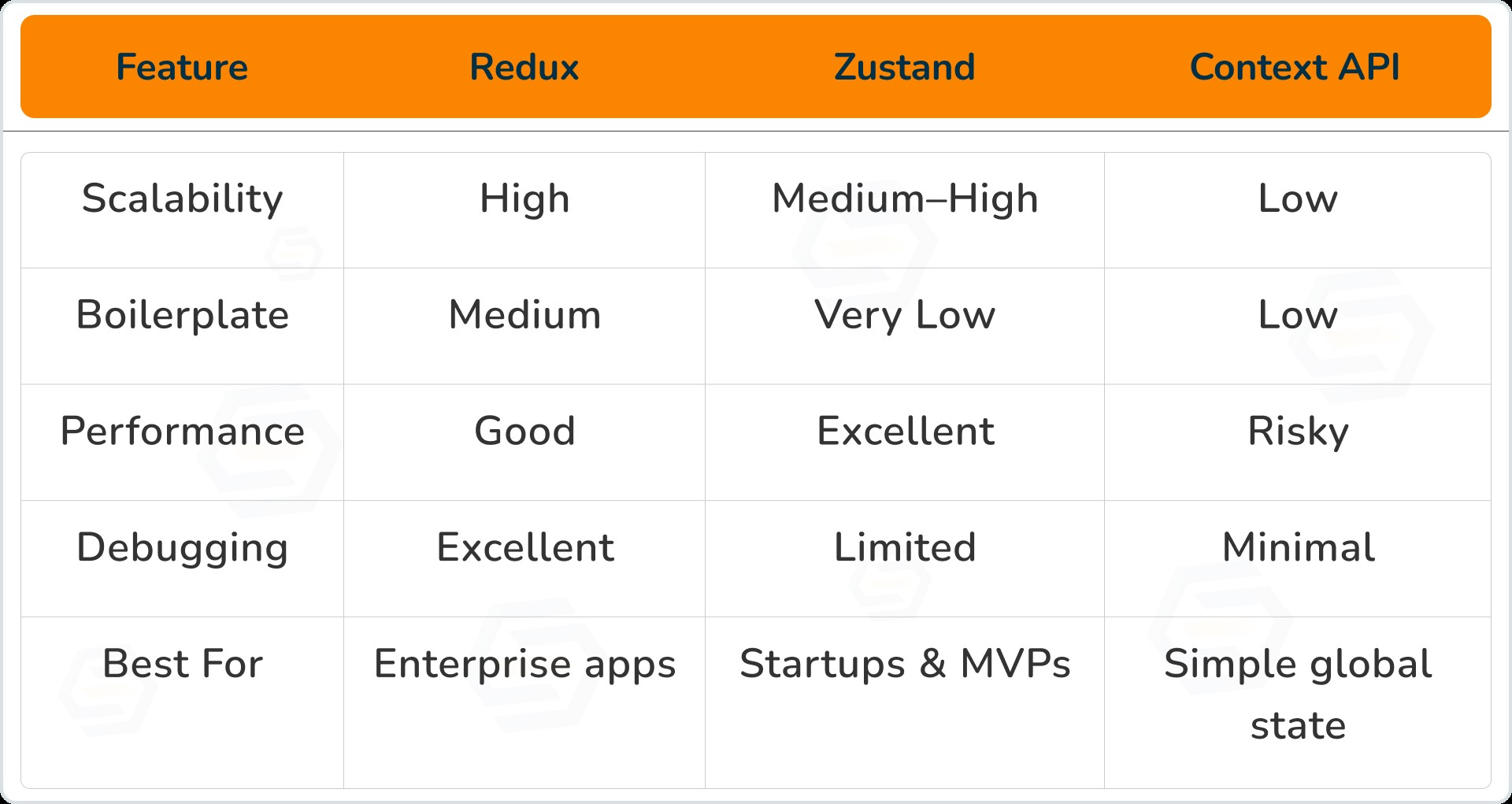
Redux vs Zustand vs Context API (Comparison)
How We Support You Choose the Right Tool
-
Study your product goals
-
Understand your team size
- Analyze future scale
- Choose the right tool
-
Build clean architecture
-
Avoid overengineering
Conclusion
-
Redux is best for large, complex, long-term systems
-
Zustand is perfect for fast, modern, performance-focused apps
- Context API is ideal for a small global state only
Dipak Pakhale
A skilled .Net Full Stack Developer with 8+ years of experience. Proficient in Asp.Net, MVC, .Net Core, Blazor, C#, SQL, Angular, Reactjs, and NodeJs. Dedicated to simplifying complex projects with expertise and innovation.
Reply